How Google Analytics Tracking Helps You Understand Your Real Audience
When I started working with small business owners on their websites, the most common question I heard was, "How do people find us, and what do they do when they get here?" It sounds simple, but answering it well takes more than just looking at a number. You need a system that captures the right data and presents it in a way you can act on. That is where Google Analytics tracking comes into the picture. It is not just about counting visitors. It is about understanding their behavior, their interests, and the path they take through your site.
Over the years, I have seen many people install Google Analytics and then never open it again. The problem is often that the default setup gives you a lot of numbers but not much insight. You might see that your bounce rate is high, but you do not know why. You might notice a spike in traffic, but you cannot tell if it came from a blog post or a social media campaign. That is where a thoughtful approach to Google Analytics tracking makes all the difference. It turns raw data into a story about your audience.
Moving from Universal Analytics to Google Analytics 4
If you have been using Google Analytics for a while, you probably remember Universal Analytics. That was the classic version that served us well for years. Google now recommends everyone use Google Analytics 4, often called GA4. The shift is more than a cosmetic update. GA4 is built around events and user-centric measurement rather than sessions and pageviews. That means you can follow a single user across multiple devices and visits, which gives you a much clearer picture of their user journey.
For a digital marketing agency focused on website design and analytics, this change is significant. With GA4, you can set up event tracking without relying heavily on cookies in the same way you did before. You can also combine data from your analytics dashboard with information from Search Console and other Google tools. The result is a more holistic view of your online presence. But to get the most out of it, you need to configure your tracking carefully.
Setting Up Conversion Tracking and Goal Tracking
One of the first things I do when I work with a new client is help them define what a conversion means for their business. For an ecommerce site, it might be a purchase. For a service provider, it could be a contact form submission or a phone call. Once you know what matters, you can set up conversion tracking in Google Analytics. This tells you how many people completed that action and where they came from. Without it, you are flying blind.
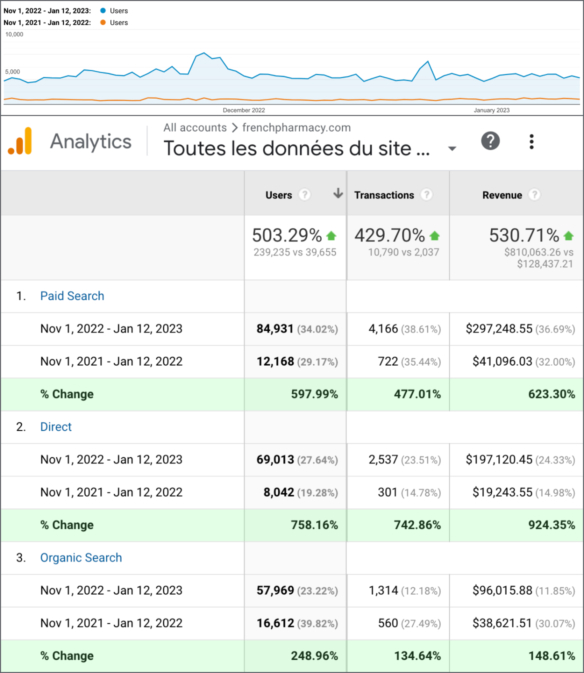
Goal tracking goes hand in hand with conversion tracking. In GA4, goals are called conversions, and you can assign a value to each one. That lets you calculate return on investment for your marketing efforts. For example, if you know that a visitor from organic search converts at a higher rate than one from social media, you can adjust your strategy accordingly. I have seen businesses double their revenue simply by paying attention to these metrics and reallocating their budget.
Using Google Tag Manager for Cleaner Data
Google Tag Manager is a tool that helps you manage multiple tracking codes on your site without editing the code directly. It is especially useful when you want to track specific actions like button clicks, form submissions, or video plays. Instead of adding a separate snippet for each tool, you put one Tag Manager container on your site and then add tags from there. This keeps your site fast and your tracking organized.
For event tracking, Tag Manager is almost essential. You can set up triggers for events like a user clicking a "Buy Now" button or scrolling to the bottom of a page. You can then send that data to your analytics dashboard as an event. This level of detail helps you understand which parts of your site are engaging and which parts are falling flat. Combined with session recording and heatmap tools, you can see exactly where users click and how far they scroll. That is the kind of data that leads to real improvements.
Understanding Bounce Rate and Click-Through Rate
Bounce rate is one of those metrics that everyone looks at but few people interpret correctly. A high bounce rate might mean visitors are not finding what they expected. But it could also mean they found exactly what they needed on a single page and left satisfied. The context matters. For a blog post, a high bounce rate is often normal. For a product page, it might signal a problem. That is why you need to look beyond the average and segment your traffic.
Click-through rate, or CTR, measures how often people click on a link or call to action. In Google Analytics tracking, you can see CTR for your organic search listings if you connect Search Console. You can also track CTR on internal links within your site. When you combine CTR with bounce rate, you get a sense of whether your content is attracting the right audience. If your CTR is high but your bounce rate is also high, your headline might be misleading. If your CTR is low, you might need to improve your meta descriptions or page titles.
Audience Segmentation and Custom Dimensions
Not all visitors are the same. Someone who comes to your site from a referral link might behave very differently from someone who arrives after searching for a specific keyword. Audience segmentation lets you group visitors by characteristics like location, device, behavior, or traffic source. In GA4, you can create segments on the fly and compare them side by side. This is one of the most powerful features for making data-driven decisions.
Custom dimensions allow you to track data that is unique to your business. For example, if you run an ecommerce site, you might want to track product categories or customer loyalty status. By adding custom dimensions, you can slice your data in ways that matter to you. This goes beyond the default reports and gives you a competitive edge. I have used custom dimensions to track the performance of different blog authors, campaign names, and even seasonal promotions. The possibilities are broad, but you need to plan ahead so you do not end up with messy data.
Real-Time Reporting and A/B Testing
Real-time reporting in Google Analytics shows you what is happening on your site at this very moment. It is great for monitoring a new campaign launch or a live event. But it is not a tool for strategic decisions. For that, you need more data over time. That is where A/B testing comes in. By testing two versions of a page or a headline, you can measure which one performs better in terms of engagement and conversions.
A/B testing works best when you have a clear hypothesis and a decent amount of traffic. You can use Google Analytics to track the results of your test, but you will need a separate tool to run the experiment. The key is to make sure your Google Analytics tracking is set up to capture the right events so you can compare the two variants accurately. Many people run tests without proper event tracking, and they end up with inconclusive results.
Ecommerce Tracking and SEO Analytics
For online stores, ecommerce tracking is a must. It tells you which products are selling, how much revenue each product generates, and where your best customers come from. GA4 has improved ecommerce tracking with better support for shopping ads and product listings. You can see the entire purchase funnel from product view to add to cart to checkout. This level of detail helps you identify where people drop off and fix those pages.
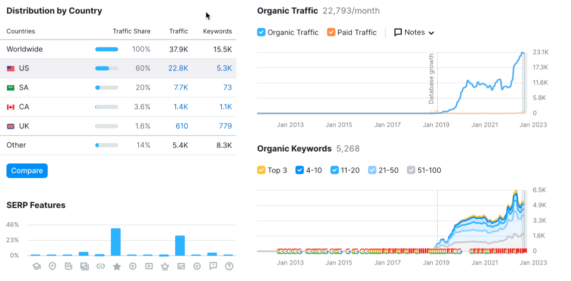
SEO analytics is another area where Google Analytics tracking shines. By combining data from Google Analytics with Search Console, you can see which keywords drive traffic, which pages rank highest, and how your click-through rates change over time. You can also track the performance of your content after you make changes. I often advise clients to check their analytics dashboard before and after an SEO update to see if the change had the desired effect. Without tracking, you are just guessing.
Data Privacy Compliance and Best Practices
With the rise of regulations like GDPR and CCPA, data privacy compliance is something every site owner needs to take seriously. Google Analytics tracking can still be used, but you need to configure it correctly. That means anonymizing IP addresses, obtaining consent where required, and being transparent about what data you collect. It also means reviewing your data retention settings in GA4 and limiting how long you keep user-level data.
I have seen businesses get fined because they did not update their privacy policy or they kept data longer than allowed. The good news is that Google provides tools to help you stay compliant. You can disable data sharing, set up consent prompts, and use the built-in controls for data deletion. The key is to make privacy a part of your tracking strategy from the start, not an afterthought.
Practical Steps to Improve Your Tracking
If you are ready to get more from your analytics, here are a few things to check:
- Make sure you are using Google Analytics 4, not the old Universal Analytics. If you have not migrated yet, do it now.
- Set up at least three conversion events that matter to your business. Track them in your analytics dashboard.
- Use Google Tag Manager for any custom event tracking you need. It keeps your site clean and your data accurate.
- Create audience segments for your top traffic sources. Compare how each group behaves.
- Review your data privacy settings and update your privacy policy to reflect what you collect.
These steps will give you a solid foundation. From there, you can explore more advanced features like custom dimensions, session recording, and heatmap tools to dig even deeper.
At the end of the day, Google Analytics tracking is not about the tool itself. It is about the questions you ask and the actions you take based on what you learn. When you set it up with intention, it becomes one of the most valuable assets in your digital marketing toolkit. It helps you see your site through the eyes of your visitors and make changes that actually improve their experience.